BIOPAC System
This is a quick guide for COBE Lab’s BIOPAC System which is used to collect various physiological signals.
BIOPAC equipment allows researchers you to collect and analyse physiological data from life science experiments. COBE Lab has invested in a lot of equipment, including wireless options, that allow the researcher to measure variables relating to skeletal muscle activity, skin conductance, and cardiovascular measures.
Table of Contents
- A list of the lab’s BIOPAC equipment and software
- How to setup for an experiment
- Data management in COBE Lab
BIOPAC equipment is simple to set up. Central to the system is the MP150 data acquisition module. A researcher then adds separate amplifier modules, transducers and electrodes, depending on what one wishes to measure. The acquisition and analysis software AcqKnowledge is then used to observe, process and analyse data.
For this guide we will look at how we can collect Electrocardiogram, Respiration and also Electrodermal signals. We will do this following the same task as showed in the Eyelink 1000 guide, where a participant is watching a series of different luminance on the computer screen. Firstly we will introduce you to the different hardware and software you’ll need.
BIOPAC hardware and software
The lab’s BIOPAC equipment includes:
-
Two MP150 systems: Basic data acquisition package including the Universal Interface Model (UIM100C).
-
9 AcqKnowledge software license for Windows
-
Three PPGED modules: Wireless BioNomadix module—matched transmitter and receiver designed to measure Blood Volume Pulse (BVP) and Electro-Dermal Activity (EDA). EDA is also known as galvanic skin response and skin conductance activity). (spec).
-
Two RSPEC modules: Wireless electrocardiography (ECG) and respiration amplifier—matched transmitter and receiver designed to collect respiration and electrocardiogram data. The system can record both simultaneously, and can record at a rate of 2000 Hz. Two channels are integrated: Channel A can measure abdominal and thoracic expansion and contraction during breathing, whilst Channel B can record electrical activity generated by the heart via attached electrodes. (spec)
-
Six EMG100C modules: Electromyogram (EMG) amplifier—amplifies general and skeletal muscle electrical activity. (spec)
-
One ECG100C module: Electrocardiogram (ECG) amplifier—reliably records electrical activity generated by the heart. (spec)
-
One GSR-100C module: wired Galvanic Skin Response (aka Electro-Dermal Activity) unit
-
Two STP100C module: Isolated digital interface. (spec)
-
Various electrodes.
MP150: The MP150 is the main box that modules are connected to.
Modules: The modules are the receivers of the wearable devices that the subjects wear in order to collect the physiological signals. There are several of these that connect to the different wearable devices.
Trigger device: In order to ensure temporal control it will many times be necessary to send signals to the software that collects and stores the physiological data. These signals can be sent using the trigger box which connects to the STP100C and the MP150 and can then be programmed to send small voltage difference at stimulus onset. This essentially gives you another variable that tells you when signals were sent, which is particularly important in event related designs.
AcqKnowledge: COBE Lab has access to BIOPAC’s AcqKnowledge software, which makes it easy to store, transform, analyse and in general interact with the data from the BIOPAC devices.
The setup
In general the setup follows the structure of:
- Setting up the hardware and their connections.
- Ensuring connection from wearable devices and AcqKnowledge.
- Ensuring reliable triggers from the experimental script to AcqKnowledge.
Setting up the hardware and their connections
First one needs to connect the MP150 to both the STP100C and the PPGED or RSPEC (depending on the physiological measure you want to record) modules. Here we use ECG, RRSP and also EDA modules with wearable devices. This could look like below:
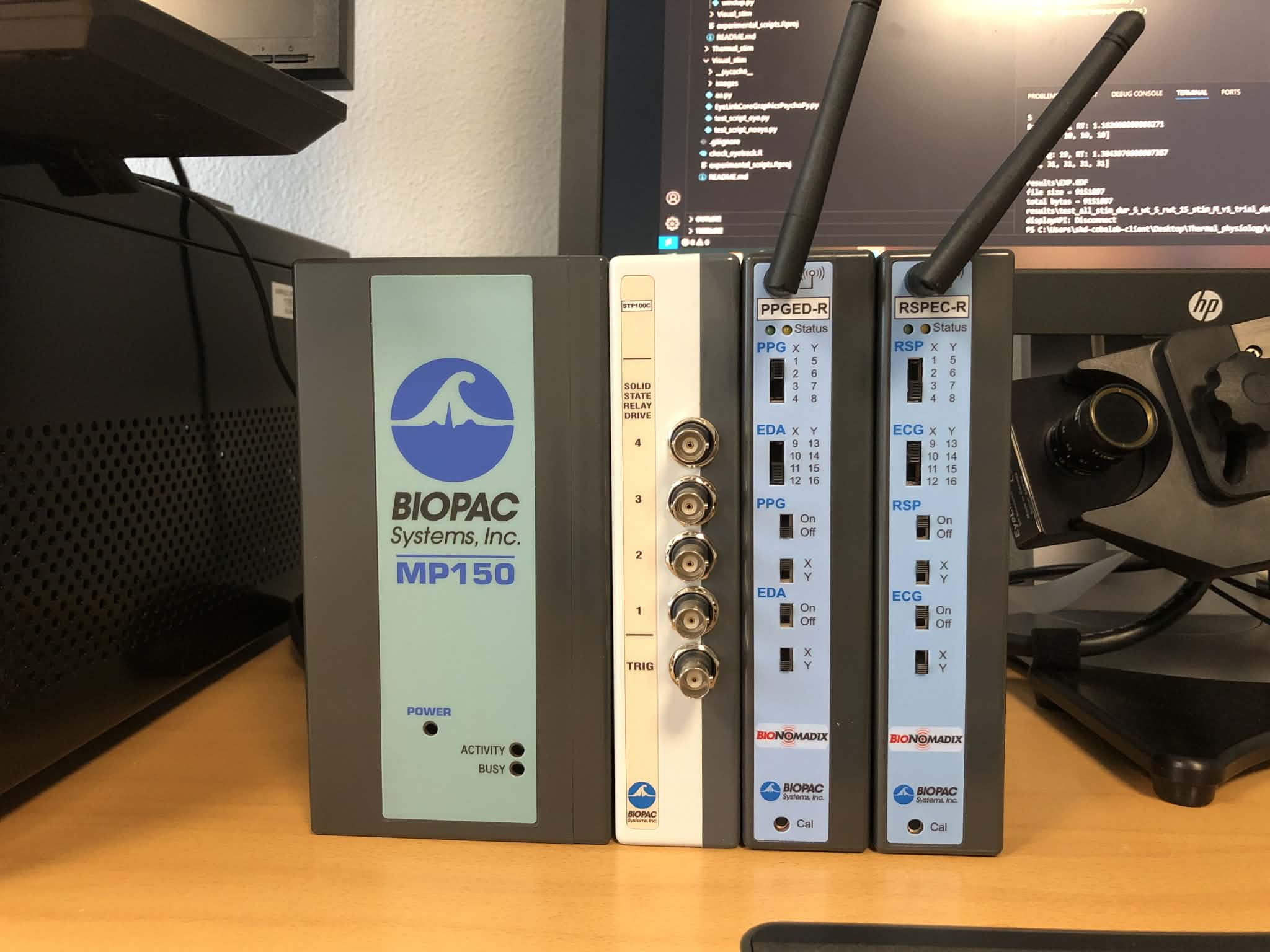
Now that all the hardware is connected one needs to open the AcqKnowledge software. To use the software you need one of the AcqKnowledge keys / USBs. When opened you should navigate to the appropriate channel configurations in order to select the appropriate outputs from the wearable devices. You do this by clicking on the “MP150” button and then “Set Up Channels”. Here under the Analog tab you need to find and select the modules that you are using. For instance to add a respiration and ECG module you click the “Add new Module” button, the find the “RSPEC-R” module and select this by clicking “Add”.
If properly selected, both the wearable devices and the configurations in AcqKnowledge, you will see that the modules connected to the MP150 will light green. Now you can select start recording in order to see if a signal goes through. Here it is very convenient to have an easily manipulated signal (such as the respiration) to see that a change in the physical device also makes a change in the AcqKnowledge software.
When all of this works and is setup we can test the connection between the trigger box, STP100C and MP150. The best way to get an additional window for the digital signal is to navigate to “Digital” in the MP150 -> Set-Up-Channgels window. Here you then click off all boxes in the 8th row. If connected properly one should see a trigger channel appear in the AcqKnowledge software, when the “Start” button in the intial interface is pressed. To test that the triggers work we have for convenience made a small python script below that sends three triggers to Acqknowledge. Please note the port the trigger box is connected to, here we assume its Port7:
import serial
from psychopy import core

ser = serial.Serial('COM7', 115200, timeout=1)


ser.write(str.encode('01'))
core.wait(0.1)
ser.write(str.encode('00'))

core.wait(1)

ser.write(str.encode('01'))
core.wait(0.1)
ser.write(str.encode('00'))

core.wait(1)

ser.write(str.encode('01'))
core.wait(0.1)
ser.write(str.encode('00'))

core.quit()
ser.close()
Data management
Remember to transfer the data to your personal AU-computer and store it correctly. You should never store data on COBE Lab’s computers due to risk of data theft and data breach. We routinely delete data stored on our equipment, so you are at risk of losing your data if you store them on our equipment.